Combine them
Put operators side by side and a mail has to match all of them: from:amy has:attachment finds Amy’s mail with files in it.
Every operator Gmail’s search understands, from Google’s own help, with an example of each. Then the searches worth keeping, and which of them Dodosend runs too.
Free for one Gmail mailbox, on macOS, Windows, and Linux.
An operator is a word with a colon, like from: or after:, followed by what to look for. Here is what Gmail’s help says about using them.
Put operators side by side and a mail has to match all of them: from:amy has:attachment finds Amy’s mail with files in it.
A space or a dash separates one number from the next, and a dot is a decimal point.
With a minus, conversations can still show up where only some of the messages match what you left out.
Once a search finds the right mail, you can use its results to set up a filter for mail like it.
Google’s list, grouped by what you’re looking for. The last column says whether the same search works in Dodosend.
| Operator | Finds | Example | In Dodosend |
|---|---|---|---|
from: | Mail from a sender | from:amy | YesBy name or address; from:me is you |
to: | Mail sent to someone | to:david | PartlyBy address, not by name |
cc:bcc: | Mail where someone was copied | cc:davidbcc:david | Partlycc: by address; no bcc: |
deliveredto: | Mail delivered to an address | deliveredto:username@example.com | No |
list: | Mail from a mailing list | list:info@example.com | No |
| Operator | Finds | Example | In Dodosend |
|---|---|---|---|
subject: | Words in the subject line | subject:dinner | Yes |
" " | An exact phrase | "dinner and movie tonight" | Yes |
+ | A word exactly as typed | +unicorn | NoA word also finds the longer words it starts |
AROUND | Two words near each other | holiday AROUND 10 vacation"secret AROUND 25 birthday" | No |
| Operator | Finds | Example | In Dodosend |
|---|---|---|---|
after:before:older:newer: | Mail from after, or before, a day | after:2004/04/16before:04/18/2004 | Partlyafter: and before:, year first (2004/04/16) |
newer_than:older_than: | Mail newer or older than a time, in days (d), months (m) or years (y) | newer_than:2dolder_than:1y | Yes |
| Operator | Finds | Example | In Dodosend |
|---|---|---|---|
in:anywhere | Mail anywhere, Spam and Trash included | in:anywhere movie | YesAnd in:inbox, in:sent, in:drafts, in:spam, in:trash |
in:archive | Archived mail | in:archive payment reminder | No |
in:snoozed | Snoozed mail | in:snoozed birthday reminder | No |
| Operator | Finds | Example | In Dodosend |
|---|---|---|---|
is: | Mail that’s important, starred, unread or read | is:importantis:starredis:unreadis:read | Partlyis:starred, is:unread and is:read |
is:muted | Muted conversations | is:muted subject:team celebration | No |
has:yellow-star | Mail with one kind of star. The others: orange-star, red-star, purple-star, blue-star, green-star, red-bang, orange-guillemet, yellow-bang, green-check, blue-info and purple-question | has:yellow-starhas:purple-question | Nois:starred finds any star |
| Operator | Finds | Example | In Dodosend |
|---|---|---|---|
label: | Mail with a label | label:friendslabel:important | PartlyPick the label from the search box’s suggestions |
category: | Mail in one of the inbox’s categories | category:primarycategory:socialcategory:promotions | Partlyprimary, social, promotions, updates and forums |
has:userlabelshas:nouserlabels | Mail with, or without, a label you made | has:userlabelshas:nouserlabels | No |
label:encryptedmail | Mail sent with client-side encryption | label:encryptedmail | No |
| Operator | Finds | Example | In Dodosend |
|---|---|---|---|
has:attachment | Mail with an attachment | has:attachment | Yes |
filename: | Attachments by name or kind of file | filename:pdffilename:homework.txt | Yes |
has:drivehas:documenthas:spreadsheethas:presentationhas:youtube | Mail with a Drive file, a Doc, a Sheet, a Slides deck or a YouTube video | has:youtube | No |
size:larger:smaller: | Mail larger or smaller than a size, in bytes, or with M for megabytes | size:1000000larger:10M | No |
| Operator | Finds | Example | In Dodosend |
|---|---|---|---|
OR{ } | Mail that matches any of several things | from:amy OR from:david{from:amy from:david} | PartlyOR, and { } after an operator: from:{amy david} |
AND | Mail that matches all of them | from:amy AND to:david | NoLeave it out: every term has to match anyway |
- | Mail without a word, or not matching an operator | dinner -movie | Yes |
( ) | Words that go together, like several in one subject | subject:(dinner movie) | Yes |
| Operator | Finds | Example | In Dodosend |
|---|---|---|---|
rfc822msgid: | One message, by its Message-ID header | rfc822msgid:200503292@example.com | No |
header: | Mail with a given header | header:X-Google-Calendar-Notification:rsvpWithNote | No |
Made of the operators above and nothing else, so they work in Gmail as they are. Swap in your own names and dates.
has:attachment larger:10MGmail only. Dodosend has no size search.
is:unread from:amy newer_than:7dWorks in Dodosend as it is.
category:promotions older_than:1yWorks in Dodosend as it is.
filename:pdf subject:invoiceWorks in Dodosend as it is.
in:anywhere "flight confirmation" after:2026/01/01Works in Dodosend as it is.
from:{amy david} -category:promotionsWorks in Dodosend as it is.
Dodosend runs a search of operators and words on the copy of your mail it keeps on your computer, so it doesn’t wait on Gmail. Type the operators you know, or let the search box build them for you.
Pick a sender, a date, a folder or a label and each one becomes a chip. The chips are the whole search, so you see exactly what it looks for.
Every search opens as a tab of its own. Press ⌘S, or Ctrl+S, give it a name, and it stays next to the Inbox.
Press Tab in the search box and say what you remember about the mail. Dodosend lists the closest mail, even when it says it in other words than yours. Voyage AI makes embeddings for fast semantic search; the text of each mail is processed once, and not kept.
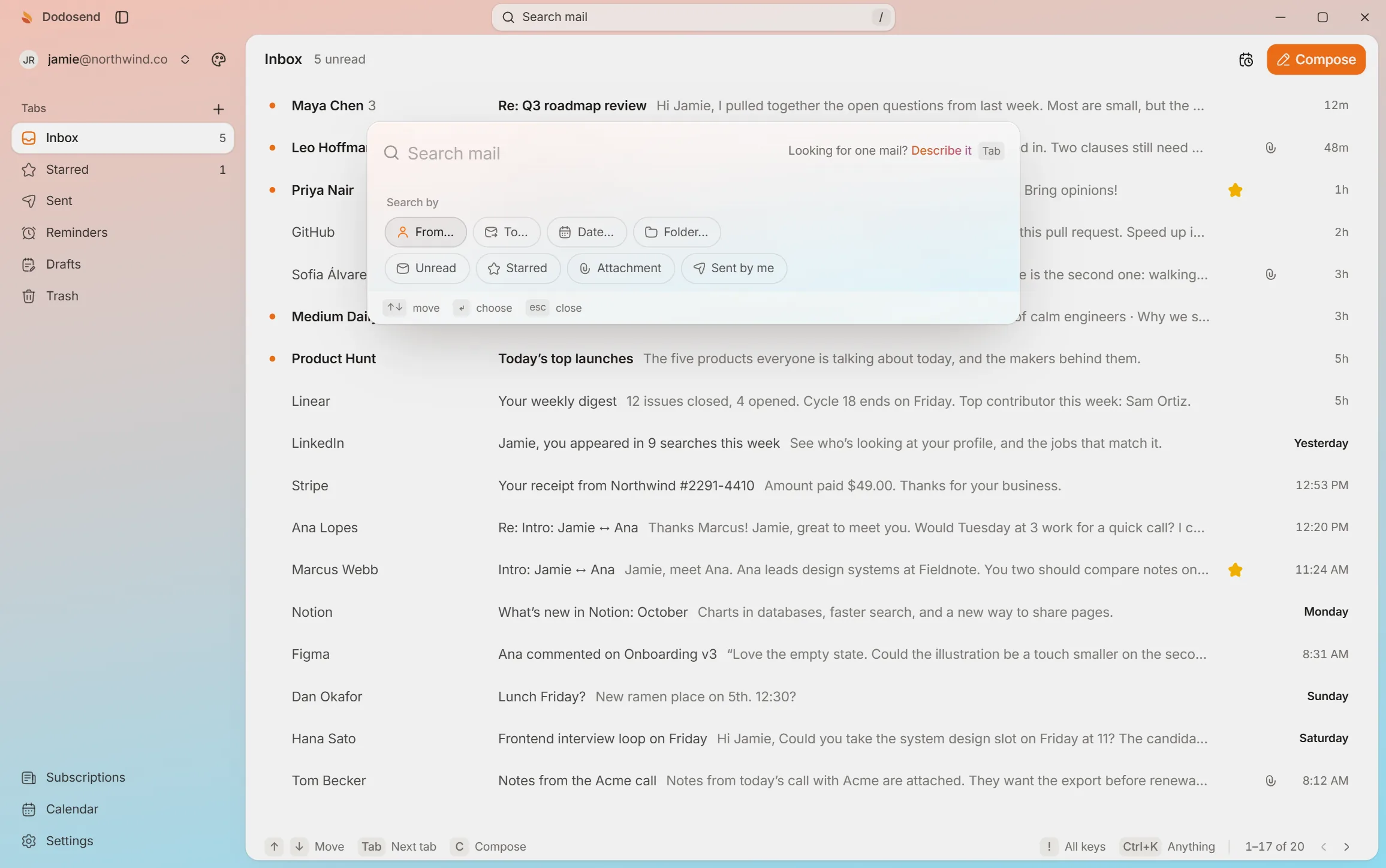
Open the search, pick “Unread”, and keep it as a tab with ⌘S. Nothing here touches a real mailbox.
Interactive demo. A hands-on look at how it works: use your keyboard or mouse, and the guide shows you what to do. The mail is made up.
10 threads
Press / to search your mail.Tap “Show me” to search your mail.
Search every folder at once. Keep a search you use as a tab in the sidebar.
Gmail’s search leaves out Spam and Trash. Add in:anywhere to search those too: in:anywhere movie looks for “movie” in every folder.
Use after: and before: with a day, like after:2004/04/16 before:2004/04/18, for the mail between them. For a time counted back from today, use newer_than: or older_than: with days, months or years: newer_than:2d, older_than:1y.
Put a minus in front of it, with no space: dinner -movie finds mail about dinner that doesn’t mention a movie. The minus works in front of an operator too, as in -category:promotions.
Gmail’s help points to filters: after a search, you can use its results to set up a filter for mail like it. In Dodosend, any search can stay as a tab of its own, next to the Inbox: press ⌘S, or Ctrl+S on Windows and Linux, and name it.
The ones people use most do: from:, to:, cc:, subject:, after:, before:, newer_than:, older_than:, has:attachment, filename:, category:, in:, is:unread, is:read, is:starred, quotes, OR, braces, parentheses and the minus. The table above marks each one. Anything Dodosend doesn’t know as an operator is searched as plain words, so nothing you type is dropped.
The same operators, on your real inbox, with any search kept as a tab. Free for one Gmail mailbox.
Free for one Gmail mailbox, on macOS, Windows, and Linux.